Does a Smart Thermostat Need a C-Wire?
You pick a smart thermostat, open the box, and see the words “C-wire required.” Then you look at your wall and wonder whether your home has one.
This is one of the most common roadblocks when upgrading a thermostat. The good news is that a missing C-wire rarely means you have to give up on a smart thermostat. This guide explains what the wire does, how to check compatibility, and what your options are if you don’t have one.
Quick Answer: Does a Smart Thermostat Need a C-Wire?
Many smart thermostats need a C-wire, but not all of them do. Some models require it. Others can run on batteries, use “power stealing” from other wires, or come with an adapter kit that works without a new wire.
The only reliable answer for your home is the manufacturer’s compatibility checker and installation manual for the exact model you want. Wiring varies by system, so always follow the manufacturer’s instructions.
What Does a C-Wire Do?
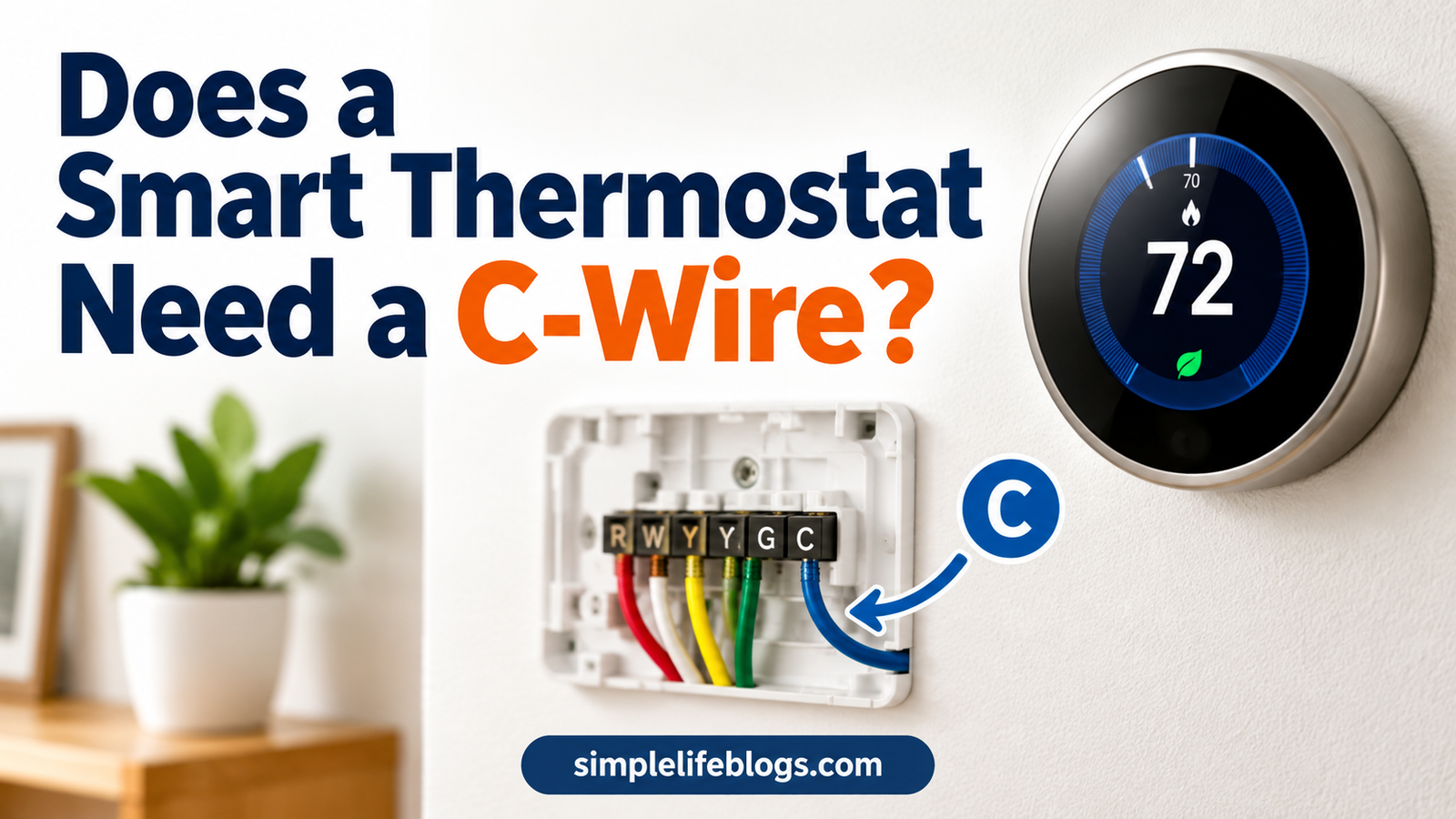
“C” stands for common. The C-wire is a low-voltage wire that gives a thermostat a steady supply of power from your heating and cooling system’s transformer.
Here is how it fits in:
- Your HVAC system has a transformer that steps household power down to about 24 volts.
- The R wire carries that 24-volt power to the thermostat.
- The C wire completes the circuit by carrying it back, so the thermostat has continuous power.
An old mechanical or basic digital thermostat uses very little power. It can run on a battery or on tiny amounts of current. A smart thermostat is different. It has a screen, a Wi-Fi radio, and sometimes sensors. It needs a steady power source, and the C-wire provides it.
Why Smart Thermostats Need Steady Power
Smart thermostats do more than switch your system on and off. They stay connected to your Wi-Fi, run an app connection, update their software, and keep a display ready. All of that uses more power than a basic thermostat.
Without enough steady power, you may notice problems such as:
- A screen that dims, flickers, or restarts
- Wi-Fi that keeps dropping
- A furnace or air conditioner that clicks on and off
- A blower fan that runs when it should not
- A battery that drains or a thermostat that shuts down
If you see any of these after an install, power is a likely cause. Contact the manufacturer or a licensed HVAC technician.
How to Check If You Have a C-Wire
You can often find out in a few minutes, with no tools beyond a screwdriver.
Step 1: Turn Off the Power
Turn off power to your heating and cooling system at the breaker or the system’s switch. Most thermostat wiring is low voltage, but you should still shut power off before touching anything.
Step 2: Remove the Thermostat Cover
Pull the thermostat faceplate away from the wall plate. Many models pop off. Some have a small screw.
Step 3: Look at the Terminals
Look for a terminal labeled C. If a wire is attached to it, you likely have a C-wire already.
Step 4: Look for Unused Wires
If no wire is on the C terminal, check whether extra wires are tucked back into the wall. Thermostat cable often contains more wires than the system uses. An unused wire may be available to serve as the C-wire.
Keep in mind:
- Wire colors are not a rule. Blue and black are common for C, but installers do not always follow the same color code. Do not rely on color alone.
- A spare wire is only useful if it is connected at both ends: at the thermostat and at the HVAC control board.
Step 5: Take a Photo and Label the Wires
Before disconnecting anything, take a clear photo of the wiring. Label each wire with the terminal letter it was on. This protects you if you need to troubleshoot or put the old thermostat back.
Step 6: Check the HVAC Control Board
If you are comfortable doing so, look at the control board in your furnace or air handler (with power off). Look for a terminal marked C or COM. If a spare wire from the thermostat cable can be connected there, you may be able to create a C-wire without running a new cable.
If you are not sure what you are looking at, stop and call a licensed HVAC technician or electrician.
Compatibility Checks Before You Buy
Before you buy any smart thermostat, check these points:
- System type. Furnace, central air, heat pump, boiler, multi-stage, and dual-fuel systems can have different wiring needs.
- Voltage. Standard smart thermostats are made for low-voltage (24V) systems. Electric baseboard heaters and some wall heaters use line voltage (120V or 240V) and need a thermostat made for that. Do not connect a low-voltage thermostat to line-voltage wiring.
- Millivolt systems. Some gas fireplaces and wall heaters use millivolt controls, which many smart thermostats do not support.
- Wire count and terminals. Heat pumps and multi-stage systems may need more wires.
- C-wire status. Does your thermostat need one? Do you have one?
- Manufacturer compatibility tool. Most major brands offer an online compatibility checker. Use it for your exact model.
Our smart thermostat guide covers more on settings and compatibility, and the smart vs programmable thermostat comparison can help if you are still deciding which type to buy.
What If You Don’t Have a C-Wire?
You usually have several options. Which one fits depends on your system and the model you choose.
Option 1: Use a Spare Wire in Your Existing Cable
If your thermostat cable has an unused wire, an installer may be able to connect it to the C terminal at both ends. This is often the simplest fix and costs nothing.
Option 2: Use the Adapter or Power Kit
Some manufacturers sell or include a C-wire adapter or power extender kit. These kits usually install at the HVAC control board and let the thermostat receive steady power using the wires you already have. Kits differ by brand and system, so use only the one the manufacturer recommends for your model and system.
Option 3: Choose a Thermostat Designed to Work Without One
Some smart thermostats are built to operate without a C-wire. They may use batteries, power stealing, or a built-in power management feature. Compatibility depends on the model and your HVAC system, so check the specifications before you buy.
Option 4: Install a Separate Plug-In Transformer
In some cases, a separate 24V transformer can supply power to the thermostat. This is a more advanced job and is not right for every system. Ask a qualified HVAC technician before trying it.
Option 5: Run a New Thermostat Wire
If the existing cable has no usable spare wire, a new multi-conductor thermostat cable can be run from the HVAC system to the thermostat. This is the most thorough fix, but it can be hard in finished walls, so many homeowners hire a professional.
Option 6: Hire a Licensed Professional
If your wiring looks confusing, your system is complex, or you are not comfortable working on it, a licensed HVAC technician or electrician can check the setup and install the thermostat. This also helps if you have a zoning panel, heat pump, or multi-stage equipment.
Power Stealing: What It Is and Why It Matters
Some thermostats can run without a C-wire by taking tiny amounts of power from the heating or cooling wires, such as W, Y, or G. This is called power stealing or power sharing.
It can work well on many systems. It can also cause issues on some, such as the furnace clicking, the blower running at odd times, or unstable thermostat behavior. If you notice this, check the manufacturer’s troubleshooting guide, and consider an adapter kit or a proper C-wire.
Quick Comparison of Your Options
| Option | Typical Difficulty | Best For |
|---|---|---|
| Spare wire in existing cable | Easy to moderate | Homes with unused wires |
| Adapter or power kit | Moderate | No spare wire, DIY-friendly |
| Thermostat that works without a C-wire | Easy | Compatible systems only |
| Plug-in transformer | Moderate to advanced | Special cases, with pro advice |
| New thermostat cable | Advanced | Long-term, permanent fix |
| Professional installation | Easiest for you | Complex systems or low confidence |
Safety and Installation Tips
- Turn off power at the breaker or system switch before you start.
- Photograph and label every wire before disconnecting.
- Never connect a low-voltage thermostat to line-voltage (120V or 240V) wiring.
- Follow the manufacturer’s installation manual for your model.
- Follow local electrical and building requirements.
- Stop and call a licensed professional if you see damaged wires, burn marks, or equipment you don’t recognize.
Will a Smart Thermostat Save Energy Even With a Workaround?
The way you power the thermostat does not change how it saves energy. Savings come from how well your temperature settings fit your routine, plus your home’s insulation, climate, and system. If you want to go further than the thermostat, the home energy efficiency guide covers other upgrades, and the home electricity use guide shows how to measure what your home actually uses. No thermostat can promise a fixed return, and real results vary from home to home.
Frequently Asked Questions
Does a smart thermostat need a C-wire?
Many do, but not all. Some run on batteries, power stealing, or an included adapter. Check the manufacturer’s compatibility checker for your model and system.
What does the C-wire do on a thermostat?
It provides continuous 24-volt power from your HVAC transformer, which keeps the screen, Wi-Fi, and sensors running.
How do I know if I have a C-wire?
Remove the thermostat faceplate and look for a wire on the terminal marked C. If there isn’t one, check for an unused wire in the cable and see whether it connects to the C terminal on the HVAC control board.
Is the C-wire always blue?
No. Blue is common, but wire colors are not standardized. Rely on the terminal labels and the control board connections, not color.
Can I install a smart thermostat without a C-wire?
Often yes, using a spare wire, an adapter kit, or a model built to work without one. The right choice depends on your system and the thermostat, so follow the manufacturer’s instructions.
What happens if a smart thermostat doesn’t get enough power?
It may restart, lose Wi-Fi, drain its battery, or cause the HVAC system to behave oddly. If this happens, check the manual or contact a professional.
Can I add a C-wire myself?
Some homeowners can, especially when there is a spare wire. If you’re unsure, or if you need to run a new cable, hire a licensed HVAC technician or electrician.
Do heat pumps and boilers need a C-wire?
Many smart thermostats still need one for these systems, and wiring can be more complex. Check the product’s compatibility information and installation guide first.
Final Thoughts
A C-wire gives a smart thermostat the steady power it needs. If you have one, installation is usually simple. If you don’t, you still have choices: a spare wire, an adapter kit, a thermostat built for no-C-wire setups, or a new cable.
Before you buy, check your system type and wiring, use the manufacturer’s compatibility checker, and read the installation manual. If anything looks unclear, a licensed professional can save you time and prevent problems.